Graduation Application Instructions
Graduation Application
Step-by-Step Guide
Getting Started with the Graduation Application
- All students must apply for graduation to receive their DMACC diploma(s). The graduation application is also where students indicate if they would like to participate in DMACC’s Commencement Ceremony. March 1 is an important deadline for students wanting to participate in Commencement, as our deadline for ordering gowns and including the student’s name in the Program occurs shortly after March 1.
- Each term there are deadlines to apply for graduation:
- Fall Graduates: November 1
- Spring Graduates: March 1
- Summer Graduates who will participate in Commencement: March 1
- Summer Graduates: August 1
- Students who are receiving more than one degree, diploma, and/or certificate need to include each program in their graduation application.
- There is no fee for graduation.
- Find more details about graduating from DMACC, as well as the Commencement Ceremony.
- You can APPLY FOR GRADUATION HERE
- Once you click the link above, you will need to log into your myDMACC account to access the graduation application. If you don’t remember your myDMACC account login details, please contact techsupport@dmacc.edu or call 515-965-7300.
Graduation Application: Page 1
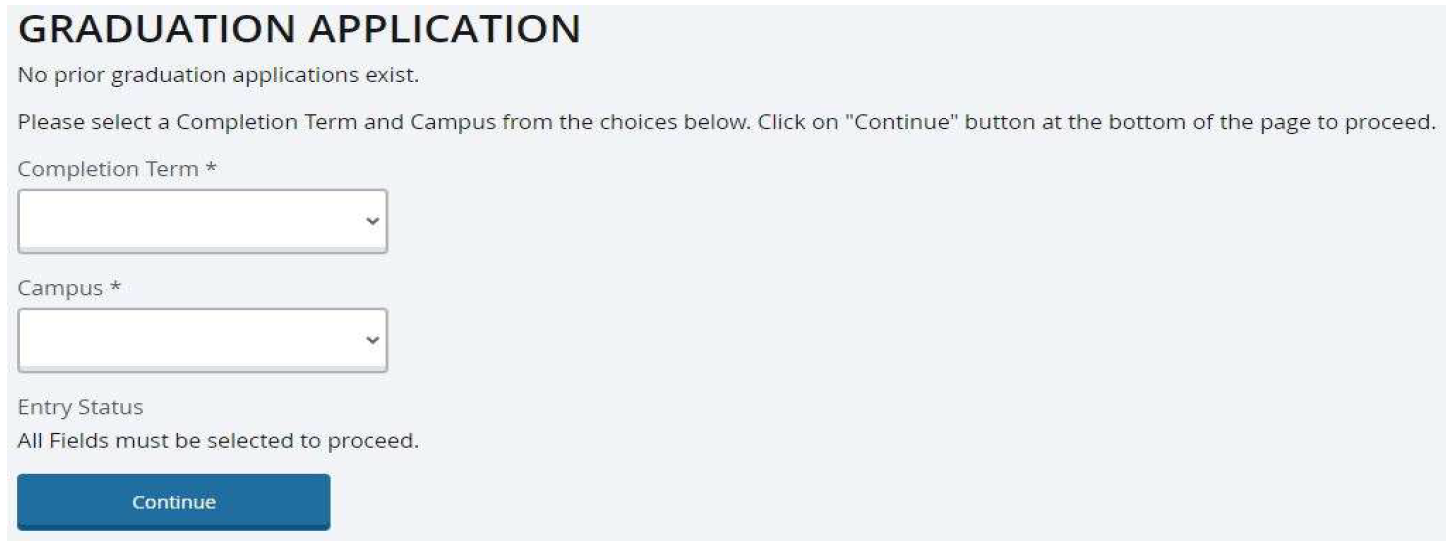
- We recommend using the Chrome browser on a computer to complete the graduation application. On the initial landing page, select a graduation Completion Term up to five years in the past, or up to one term in the future.
- Select the DMACC Campus primarily attended. Online-only students can select Ankeny as your campus. Click Continue.
Graduation Application: Page 2
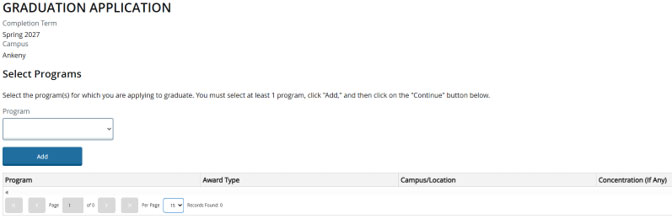
- On page two, select your academic program(s) from the Program drop-down menu. Click the Add button for each program you intend to graduate from. The program(s) will be added in the table below. Once finished, click Continue.
Graduation Application: Page 3
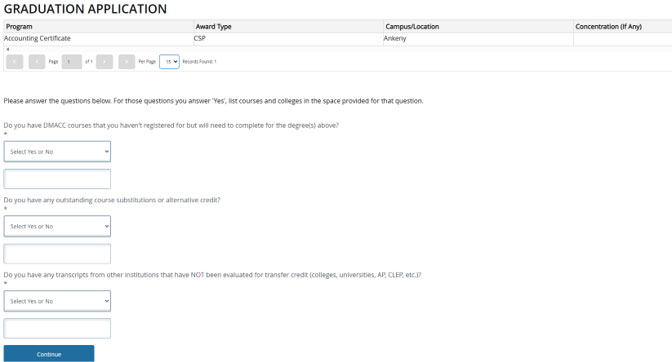
The program(s) you’ve applied to graduate from will be visible on the top of the page. You will now be prompted with three questions:
- Do you have any DMACC courses you haven’t registered for but will need to complete
for the degree(s) above?
- If you are applying to graduate from DMACC the following term, there are likely still course(s) left to complete, and registration may not have opened yet. List all courses left to take.
- Do you have any outstanding course substitutions or alternative credit?
- If you have worked with your academic department to submit a course substitution form or alternative credit, indicate “yes”, and list the course(s).
- Do you have any transcripts from other institutions that have not been evaluated for
transfer credit?
- If you have previously attended another college or university, and the transcript has not been sent to DMACC for evaluation, please indicate “yes.”
Graduation Application: Page 4
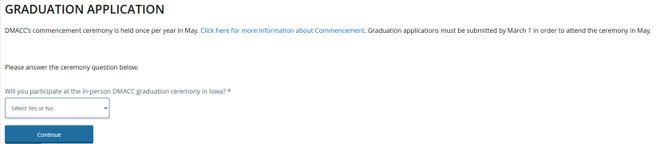
- Indicate if you would like to join DMACC’s in-person graduation Commencement ceremony in Iowa. Answering “Yes” or “No” will impact the questions shown on the following page.
- Policy change: Beginning with the May 2027 commencement ceremonies, one-course certificate graduates are no longer eligible to participate.
- All diplomas are mailed to graduates approximately six weeks after the end of the semester, whether you choose to participate in commencement or not.
- Participation in Commencement ceremonies are free of charge.
Graduation Application: Page 5
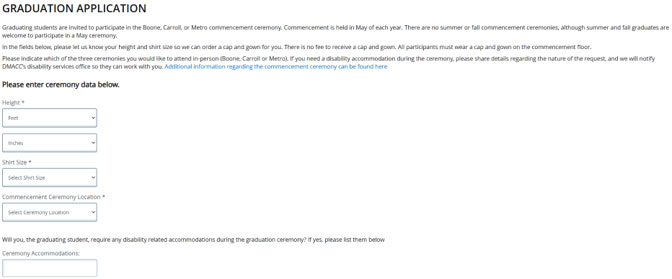

If you select “Yes” to attend the in-person Commencement ceremony, you will see additional questions:
- Enter your height.
- Your gown size. This should match your sweatshirt size.
- Enter your Commencement Ceremony Location. Ankeny, Newton, Online, Urban, and West all participate in the Metro Commencement in Des Moines, Iowa. Boone and Carroll hold their own ceremonies on those respective DMACC campuses.
All students, regardless of whether they participate in a Commencement ceremony, will be asked if they would like their graduation announcement posted in an Iowa newspaper. You can select up to two newspapers.
Graduation Application: Page 6
- Your information should automatically populate into page six of the Graduation Application.
You should see:
- Your name. The name entered on this page is exactly how it will print on your diploma(s).
- Your address. The address entered here is where the diploma will be mailed six weeks after the graduating term has finished. If you plan to move after graduation, please carefully consider where to mail the diploma(s). Replacement diploma(s) are $10 each.
- Your email address.
- Your phone number with the digits only (5159646644 instead of 515-964-6644).
-
CAREFULLY REVIEW THIS INFORMATION. IT IMPACTS THE NAME PRINTED ON THE DIPLOMA AND WHERE THE DIPLOMA IS MAILED.
Graduation Application: Page 7
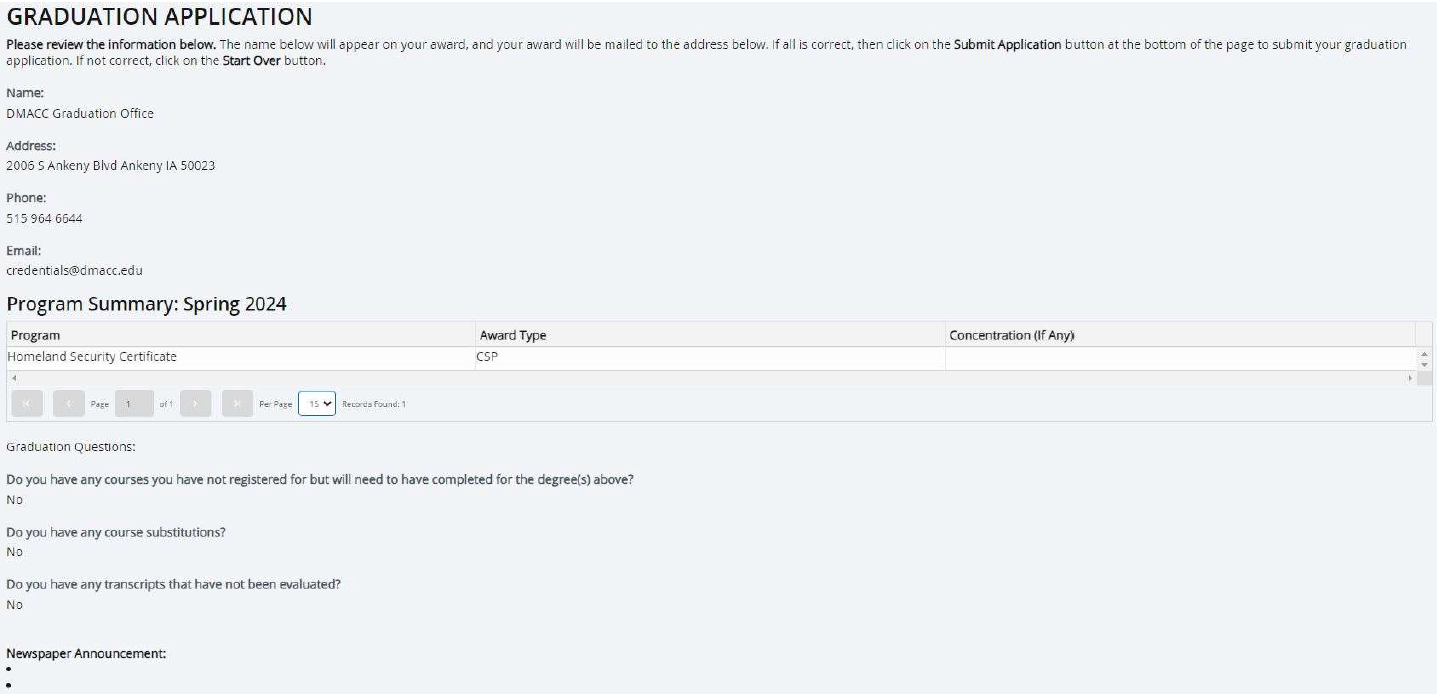
- The final page of the graduation application is an overview of details entered. Again, please carefully review the details before submitting. There is no back button on this form, so you will need to click “Start Over” if an error is made.
- Once you have confirmed the information is correct, click the “Submit Application” button to send the form electronically to the Graduation office.
- If you later determine that you want to submit another graduation application for a different program or term, follow the same process from the beginning.
- If the graduation application is showing an error that stops the submission, please try the following: use the Chrome browser on a computer, check that each question is answered before trying to submit (note any warnings), enter digits only in the phone number field, clear your computer’s cache, submit one graduation application per academic program.
- If the graduation application will not submit after trying the items above, log into myDMACC to submit a Tech Support ticket, attaching a screenshot.